Learning GTK

Preface
I suddenly wanted to play around with GTK, so…
I gave it a shot and tried to make one using C.
Overall, it’s not that hard — you just use functions…
But it’s long… really long…
gtk.h
To write a GTK program, you first need to import this library, but only after installing GTK.
And you need to add some parameters when compiling…
Installing GTK
GTK has been updated to version 4 now, but I’m using version 3 here.
On Arch, just install it directly:
$ sudo pacman -S gtk3Header File
Then write this at the beginning of the program to start coding:
#include <gtk/gtk.h>Building an Empty Window
C might be a bit more complex. Before it can load a window, we need to define two parameters in the main function…
I don’t fully understand it either — just treat it as standard format.
One is an integer (int) type, named argc:
int main(int argc, )The other is a char type, named argv, but it’s written differently — we need to write “char *argv”:
int main(int argc, char *argv[])Then write the curly braces, and we can start coding:
#include <gtk/gtk.h>
int main(int argc, char *argv[])
{

}
First, we need to initialize GTK:
gtk_init(&argc, &argv);Write these two parameters — remember to add & before the variable. This seems to be a pointer… or something…
Wuwuwu, I’m not very good at C…
Alright, let’s continue. Write it inside the main function:
#include <gtk/gtk.h>
int main(int argc, char *argv[])
{
    gtk_init(&argc, &argv);
}";" must not be omitted! Don’t ask why!
If you can run a C program without writing ";", I’ll drink 1L of soda in one go.
Then we need to create a window:
GtkWidget *window = gtk_window_new(GTK_WINDOW_TOPLEVEL);*window is the widget name, followed by a function from gtk.h. Yes, it’s called like this, but it’s very long.
You can name *window something else, as long as you type it correctly later…
Then our code becomes:
#include <gtk/gtk.h>
int main(int argc, char *argv[])
{
    gtk_init(&argc, &argv);
    GtkWidget *window = gtk_window_new(GTK_WINDOW_TOPLEVEL);
}
Then to make the window display, we need to add this line:
gtk_widget_show_all(window);And this line to fully start GTK:
gtk_main();Finally, add return 0;
The complete code becomes:
#include <gtk/gtk.h>

int main(int argc, char *argv[])
{
    gtk_init(&argc, &argv);
    GtkWidget *window = gtk_window_new(GTK_WINDOW_TOPLEVEL);
    gtk_widget_show_all(window);
    gtk_main();
    return 0;
}
Then we need to compile it. As mentioned earlier, compilation requires a long string of commands.
First, cd to the directory where the code file is located, then type:
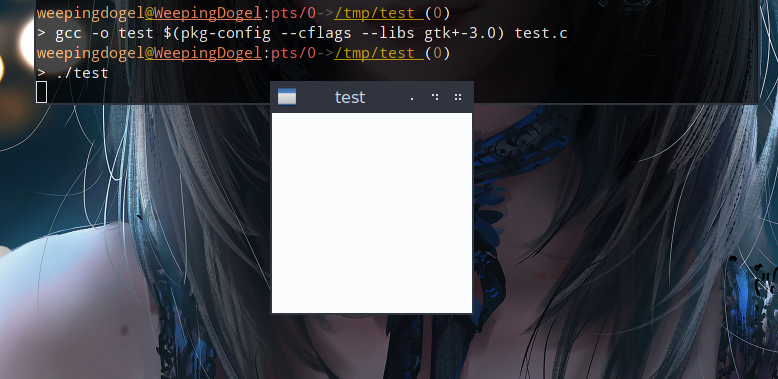
$ gcc -o test $(pkg-config --cflags --libs gtk+-3.0) filename.cChange filename.c to your code file name, and test can be changed to whatever name you want.
If there are no errors, it compiled successfully.
Then type this in the terminal:
$ ./testA GTK window program is born! But it requires CTRL + C to end, because this is just a visual rendering — the window buttons don’t work.
You can add more details later. For everything, refer to the GTK official documentation.
And I’ve also written an example here for reference:
Also made randomly
Summary
Overall, it doesn’t seem particularly difficult…
It’s just too long…
What I wrote above might not show how long it is, but when there are many widgets…
Still, I’ll try to keep learning.